
Telegram X Android updated to stable version 0.25.6.1647
What's new:
— Added built-in translation tool: Settings — Language — Translation.
— Advanced text formatting and draft translation.
— View and Set Emoji Status if you have Telegram Premium subscription.
Fixed:
— Peer-to-peer voice calls now rely on the new library, which fixes issues when calling people with an iOS-based device and improves quality
— In-app YouTube player now works through web frame, as Google has dropped native player support
— Telegram X now relies on fully public & reproducible TDLib version & OpenSSL 1.1.1u
— Bugfixes and improvements.
Read more about this update in the article: telegra.ph/Telegram-X-08-02
Download from Google Play, or now from official channel @tgx_log.
#android #telegramX #update
What's new:
— Added built-in translation tool: Settings — Language — Translation.
— Advanced text formatting and draft translation.
— View and Set Emoji Status if you have Telegram Premium subscription.
Fixed:
— Peer-to-peer voice calls now rely on the new library, which fixes issues when calling people with an iOS-based device and improves quality
— In-app YouTube player now works through web frame, as Google has dropped native player support
— Telegram X now relies on fully public & reproducible TDLib version & OpenSSL 1.1.1u
— Bugfixes and improvements.
Read more about this update in the article: telegra.ph/Telegram-X-08-02
Download from Google Play, or now from official channel @tgx_log.
#android #telegramX #update
👍36❤10🤡8🎉3👎1🤯1
Telegram Banned in Iraq
The Iraqi Ministry of Communications announced that they are banning access to Telegram for reasons related to “national security”.
In the statement the ministry points out that the government tried to contact Telegram multiple times to establish cooperation around blocking Iraqi citizen sensitive info leaks, but the messenger never responded.
The Ministry of Communications affirms its respect for citizens' rights to freedom of expression and communication, without compromising the security of the state and its institutions, and expresses its confidence in citizens' understanding of this measure [banning Telegram]. — The Iraqi Ministry of Communications
In the regions of Iraq where Telegram is banned, Telegram has been gaining popularity over Facebook products (WhatsApp, Messenger, Instagram Direct). Iraqi state representatives are still publishing news to Telegram regardless of the ban. Some have already announced their migration to alternative platforms.
Users from Iraq have been reporting connectivity issues since yesterday, they are still able to circumvent the ban with proxies and VPNs. There is also an increasing number of reports on DownDetector regarding this.
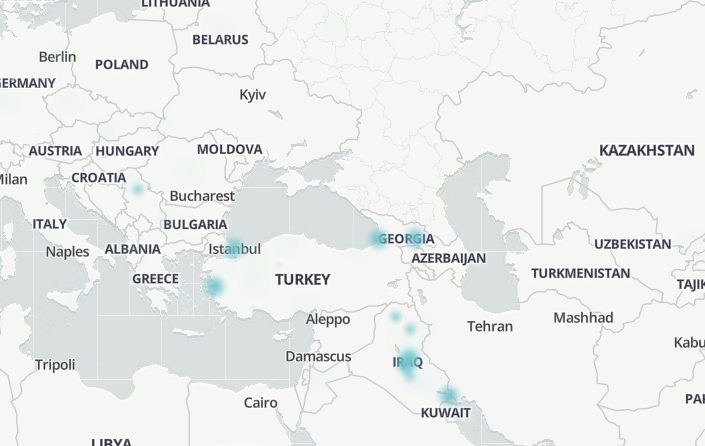
The DownDetector reports not only come from Iraq, but also from countries which are near it: Georgia and Turkey. Twitter users from Iraq, Georgia, and Turkey are reporting Telegram connectivity issues, too. The cause of the issues in Georgia and Turkey is still unclear. It may be that the ban in one country has affected others because of the cross-dependent Internet infrastructure in countries located close to each other — cases like these have happened before.
One of the main reasons for the ban is the numerous data leaks of Iraqi citizens from government databases that were distributed on Telegram and other platforms since then. The government might be trying to seize access to the leaked data, prevent criticism, or pressure Telegram into cooperation.
#Iraq #bans
The Iraqi Ministry of Communications announced that they are banning access to Telegram for reasons related to “national security”.
In the statement the ministry points out that the government tried to contact Telegram multiple times to establish cooperation around blocking Iraqi citizen sensitive info leaks, but the messenger never responded.
The Ministry of Communications affirms its respect for citizens' rights to freedom of expression and communication, without compromising the security of the state and its institutions, and expresses its confidence in citizens' understanding of this measure [banning Telegram]. — The Iraqi Ministry of Communications
In the regions of Iraq where Telegram is banned, Telegram has been gaining popularity over Facebook products (WhatsApp, Messenger, Instagram Direct). Iraqi state representatives are still publishing news to Telegram regardless of the ban. Some have already announced their migration to alternative platforms.
Users from Iraq have been reporting connectivity issues since yesterday, they are still able to circumvent the ban with proxies and VPNs. There is also an increasing number of reports on DownDetector regarding this.
The DownDetector reports not only come from Iraq, but also from countries which are near it: Georgia and Turkey. Twitter users from Iraq, Georgia, and Turkey are reporting Telegram connectivity issues, too. The cause of the issues in Georgia and Turkey is still unclear. It may be that the ban in one country has affected others because of the cross-dependent Internet infrastructure in countries located close to each other — cases like these have happened before.
One of the main reasons for the ban is the numerous data leaks of Iraqi citizens from government databases that were distributed on Telegram and other platforms since then. The government might be trying to seize access to the leaked data, prevent criticism, or pressure Telegram into cooperation.
#Iraq #bans
😱61🤡52🤯15👍12👎8🐳8💔6❤5
MIUI identifies Telegram as a dangerous app
Xiaomi's new MIUI security feature has identified Telegram as a dangerous app.
The new feature, which was launched in China in February 2022, scans sideloaded apps "for security vulnerabilities and illegal content".
If an app is found to contain malware or other harmful content, MIUI will force users to uninstall it. There are claims that the incident also gets reported to Chinese police, but there's no clear evidence on that.
The scanner claims Telegram contains fraudulent content, and thus must not be used.
Listing Telegram as a dangerous app is probably another sign of the Chinese government's crackdown on free speech and privacy. In recent years, the Chinese government has blocked or limited access to an increasing number of websites and apps, including Facebook, Twitter, and Google.
#xiaomi #censorship
Xiaomi's new MIUI security feature has identified Telegram as a dangerous app.
The new feature, which was launched in China in February 2022, scans sideloaded apps "for security vulnerabilities and illegal content".
If an app is found to contain malware or other harmful content, MIUI will force users to uninstall it. There are claims that the incident also gets reported to Chinese police, but there's no clear evidence on that.
The scanner claims Telegram contains fraudulent content, and thus must not be used.
Listing Telegram as a dangerous app is probably another sign of the Chinese government's crackdown on free speech and privacy. In recent years, the Chinese government has blocked or limited access to an increasing number of websites and apps, including Facebook, Twitter, and Google.
#xiaomi #censorship
🤡232👎39🤯19👍16💔8❤5🐳4😱3🎉3
Telegram Stories for Non-Premium Users
Telegram’s server configuration has been updated and now features different story posting limits for regular and Premium users.
This might mean that in the next update Telegram will allow everyone to post stories, no Telegram Premium subscription required.
It is important to note that the values on the screenshot are from Telegram’s test server and they may differ on release.
Telegram Info assumes this is not the only restriction stories will have for regular users.
UPD: For the main server (following the test one), preliminary values for limits on the number of published stories appeared.
#stories #limits
Telegram’s server configuration has been updated and now features different story posting limits for regular and Premium users.
This might mean that in the next update Telegram will allow everyone to post stories, no Telegram Premium subscription required.
It is important to note that the values on the screenshot are from Telegram’s test server and they may differ on release.
Telegram Info assumes this is not the only restriction stories will have for regular users.
UPD: For the main server (following the test one), preliminary values for limits on the number of published stories appeared.
#stories #limits
🎉96🤡62👍38❤16👎11🐳2🤯1🌚1💔1
Publishing Stories in Telegram for All Users
An update to Telegram version 10.0 is approaching, marking the messenger's tenth anniversary. Yesterday, the Beta version for Android was released, bringing several new features and improvements related to Telegram Stories.
The ability to create and publish stories has become available to all users, including those without a Telegram Premium subscription, but currently only in the Beta version of the messenger.
The preliminary daily limit is set at 3 stories per day for users without a subscription and 100 stories per day for Premium subscribers.
⭐ Some story features will be available exclusively to Premium subscribers. These include priority placement, incognito mode, saving the view list, flexible auto-deletion settings, and much more.
For more information about the upcoming Telegram updates, visit our channel @betainfoen.
An update to Telegram version 10.0 is approaching, marking the messenger's tenth anniversary. Yesterday, the Beta version for Android was released, bringing several new features and improvements related to Telegram Stories.
The ability to create and publish stories has become available to all users, including those without a Telegram Premium subscription, but currently only in the Beta version of the messenger.
The preliminary daily limit is set at 3 stories per day for users without a subscription and 100 stories per day for Premium subscribers.
For more information about the upcoming Telegram updates, visit our channel @betainfoen.
Please open Telegram to view this post
VIEW IN TELEGRAM
🤡83👍53👎20❤7😱2🎉2
Telegram Info English
Telegram Banned in Iraq The Iraqi Ministry of Communications announced that they are banning access to Telegram for reasons related to “national security”. In the statement the ministry points out that the government tried to contact Telegram multiple times…
Iraq to Lift the Telegram Ban
In a recent announcement (alt), the Iraqi Ministry of Communications stated that the Telegram ban will be lifted by tomorrow, August 13.
The decision is response to Telegram establishing a communication channel and expressing their readiness to expose those who leaked citizens’ data. — The Iraqi Ministry of Communications
Some users have noticed that Telegram has already started to work again without using proxies. This comes after several suspected channels and bots were banned.
About a week ago, Telegram was banned in Iraq (excluding the autonomous Kurdistan Region), and blamed for being a distribution channel for citizens’ leaked data and ignoring cooperation requests from the Iraqi government.
#Iraq #bans
In a recent announcement (alt), the Iraqi Ministry of Communications stated that the Telegram ban will be lifted by tomorrow, August 13.
The decision is response to Telegram establishing a communication channel and expressing their readiness to expose those who leaked citizens’ data. — The Iraqi Ministry of Communications
Some users have noticed that Telegram has already started to work again without using proxies. This comes after several suspected channels and bots were banned.
About a week ago, Telegram was banned in Iraq (excluding the autonomous Kurdistan Region), and blamed for being a distribution channel for citizens’ leaked data and ignoring cooperation requests from the Iraqi government.
#Iraq #bans
🤡81👍21🎉19🐳7🤯5
Pavel Durov about birthday:
In just a decade, Telegram gained over 800 million active users purely thanks to word of mouth. Through numerous updates and improvements over the years, Telegram has redefined what a modern messaging experience should be like.
The next step for Telegram is to go beyond messaging and spearhead innovation in social media in general. We should use our popularity to change the lives of billions for better, to inspire and uplift people on our planet.
Today’s gradual roll-out of stories for all users marks the beginning of this new stage in the history of Telegram. While this past decade was exciting, the next 10 years will be the time when Telegram reaches its true potential.
Please open Telegram to view this post
VIEW IN TELEGRAM
🎉89❤25👍14🤡10👎9🐳6

Pavel Durov Answered a Few Questions Regarding Stories, Its Design and Limitations
Yesterday morning, Durov answered a few questions in one of the major chats of Telegram:
❓ Does it make sense to compare the functionality of stories in Telegram and statuses in WhatsApp, as well as their limits?
❓ Was the decision to offer saving stories to the gallery as a premium feature a worthwhile choice?
❓ Why are the abilities to include formatting and links in stories limited to Premium users?
❓ The header on iOS is appealing, can we expect something similar for the Android app?
#stories
Yesterday morning, Durov answered a few questions in one of the major chats of Telegram:
#stories
Please open Telegram to view this post
VIEW IN TELEGRAM
Please open Telegram to view this post
VIEW IN TELEGRAM
❤77👍38🤡38🎉15👎6🤯1😱1
Stories and Telegram’s 10th Anniversary
Telegram for Android, iOS and macOS, as well as the Unigram, have been updated to version 10.0. Telegram Desktop has been updated to version 4.9.
Today is Telegram’s 10th birthday. To celebrate, one of the largest updates in the history of the platform is being rolled out.
In this update, Telegram introduces Stories, with a unique dual-camera shooting mode, flexible privacy settings for each story, and many other features.
Stories allow you to quickly share special moments and find out what’s new with your conversations and contacts. Since we can’t cover all updates in a single post, we will be talking about them in a series of posts.
More on stories
• Viewing Stories.
• Hiding Stories from the Header.
• Managing Notifications for New Stories.
• Reacting & Replying to Stories.
• Creating Stories.
• Story Privacy Settings.
• Story Expiration Time.
• Editing Stories.
• Story View Statistics.
• Premium Features for Stories.
Article: telegram.org/blog/stories
Android: Google Play, APK from the official website, or a verified channel
iOS: App Store
Desktop: from the official website or GitHub
macOS: App Store, from the official website, or the verified channel
Unigram for Windows 10+: Microsoft Store | Direct download | Installation instructions
Telegram for Android, iOS and macOS, as well as the Unigram, have been updated to version 10.0. Telegram Desktop has been updated to version 4.9.
Today is Telegram’s 10th birthday. To celebrate, one of the largest updates in the history of the platform is being rolled out.
In this update, Telegram introduces Stories, with a unique dual-camera shooting mode, flexible privacy settings for each story, and many other features.
Stories allow you to quickly share special moments and find out what’s new with your conversations and contacts. Since we can’t cover all updates in a single post, we will be talking about them in a series of posts.
More on stories
• Viewing Stories.
• Hiding Stories from the Header.
• Managing Notifications for New Stories.
• Reacting & Replying to Stories.
• Creating Stories.
• Story Privacy Settings.
• Story Expiration Time.
• Editing Stories.
• Story View Statistics.
• Premium Features for Stories.
Article: telegram.org/blog/stories
Android: Google Play, APK from the official website, or a verified channel
iOS: App Store
Desktop: from the official website or GitHub
macOS: App Store, from the official website, or the verified channel
Unigram for Windows 10+: Microsoft Store | Direct download | Installation instructions
Telegram
Telegram Info English
Viewing Stories
• By default, all stories from your contacts that you are allowed to view are displayed above the chat list.
• You can scroll down to expand the stories section.
• To view a someone’s story, simply tap their profile photo.
• You can also…
• By default, all stories from your contacts that you are allowed to view are displayed above the chat list.
• You can scroll down to expand the stories section.
• To view a someone’s story, simply tap their profile photo.
• You can also…
🎉37👍13🤡12❤10👎5
Stories isn't Available to Everyone yet
Some of our subscribers who aren’t subscribed to Telegram Premium have noticed that they are still not able to post stories after updating the app to the latest version, 10.0.
It is expected that the future will gradually be available to all users on the latest versions of the apps.
#stories
Some of our subscribers who aren’t subscribed to Telegram Premium have noticed that they are still not able to post stories after updating the app to the latest version, 10.0.
It is expected that the future will gradually be available to all users on the latest versions of the apps.
#stories
👍81🤡63👎17❤4🌚4
Viewing Stories
• By default, all stories from your contacts that you are allowed to view are displayed above the chat list.
• You can scroll down to expand the stories section.
• To view a someone’s story, simply tap their profile photo.
• You can also view stories from other Telegram users that allow you to do so: their profile picture will have a colored ring if they have an active story. This can be anywhere from your chat list or the list of participants in a group.
• Tap on the right and left sides of the screen while viewing a story to move to the next or previous story, or swipe right and left to see stories from the next user.
More on this update can be found here.
• By default, all stories from your contacts that you are allowed to view are displayed above the chat list.
• You can scroll down to expand the stories section.
• To view a someone’s story, simply tap their profile photo.
• You can also view stories from other Telegram users that allow you to do so: their profile picture will have a colored ring if they have an active story. This can be anywhere from your chat list or the list of participants in a group.
• Tap on the right and left sides of the screen while viewing a story to move to the next or previous story, or swipe right and left to see stories from the next user.
More on this update can be found here.
👍43🤡29👎7❤3
Hiding Stories from the Header
• If you want to hide stories of a specific user from the header without blocking them or removing them from your contacts, tap and hold their profile picture, and choose “Hide Stories.” This will move their stories to the archive.
• To unhide, open the archive, tap and hold their profile picture, and choose “Don‘t Hide Stories.“
• It‘s not possible to completely disable stories.
• Note that your chat with the user won’t be moved to the archive, and they won’t know that you have archived their stories.
More on this update can be found here.
• If you want to hide stories of a specific user from the header without blocking them or removing them from your contacts, tap and hold their profile picture, and choose “Hide Stories.” This will move their stories to the archive.
• To unhide, open the archive, tap and hold their profile picture, and choose “Don‘t Hide Stories.“
• It‘s not possible to completely disable stories.
• Note that your chat with the user won’t be moved to the archive, and they won’t know that you have archived their stories.
More on this update can be found here.
👍40🤡26❤7👎7
Managing Notifications for New Stories
• By default, you will get notified when one of five contacts that you communicate with most frequently posts a story.
• You can manually enable or disable notifications for stories from any user by opening one of their stories, opening the menu, and toggling the “Notify about Stories” setting.
• You can also enable or disable notifications from the header: tap and hold the user’s profile picture and toggle the “Notify about Stories” setting.
• Story notifications can be fully customized by adding exceptions for individual users or entire groups.
More on this update can be found here.
• By default, you will get notified when one of five contacts that you communicate with most frequently posts a story.
• You can manually enable or disable notifications for stories from any user by opening one of their stories, opening the menu, and toggling the “Notify about Stories” setting.
• You can also enable or disable notifications from the header: tap and hold the user’s profile picture and toggle the “Notify about Stories” setting.
• Story notifications can be fully customized by adding exceptions for individual users or entire groups.
More on this update can be found here.
👍43🤡19👎8❤5
Reacting and Replying to Stories
• While viewing someone’s story, you can react to it by clicking the heart icon, or by simply opening reply dialog and choosing a reaction.
• You can also tap and hold the heart icon to choose a different reaction without having to open the reply dialog.
• Notice that in however way you react, you will be added to a list of those who have viewed the story, even if you are in Stealth Mode.
More on this update can be found here.
• While viewing someone’s story, you can react to it by clicking the heart icon, or by simply opening reply dialog and choosing a reaction.
• You can also tap and hold the heart icon to choose a different reaction without having to open the reply dialog.
• Notice that in however way you react, you will be added to a list of those who have viewed the story, even if you are in Stealth Mode.
More on this update can be found here.
👍55🤡26❤11👎5
This media is not supported in your browser
VIEW IN TELEGRAM
Creating Stories
• Create stories using photos or videos either from your gallery or through the in-app camera.
• You can use combine multiple images from your gallery in one story: open the sticker panel in the editor and tap the photo icon in the bottom corner. There, you can also find and choose images from the internet.
Dual Camera Mode
• Photos and videos can be taken simultaneously from both front and back cameras, and switch between them even while recording.
• The recording from one camera fills the entire screen, while the other camera appears as a small circle that can be moved around even while recording.
• This feature is not available on all devices.
Media Editor
• Using the built-in media editor, you can attach stickers, GIFs, text, and location tags, and make adjustments to brightness, contrast, and saturation.
• When adding geotags, you can specify any point on the map or choose a suitable one from the list. The location you choose doesn't necessarily have to be the place you live or the place where the photo or video was taken.
Story Captions
• Stories have a separate text field where you can add a more detailed description.
• Text captions support @mentions and links, allowing you to tag your friends and share websites.
• The maximum length of the caption is 200 character for regular users, and 2048 characters for premium users.
More on this update can be found here.
• Create stories using photos or videos either from your gallery or through the in-app camera.
• You can use combine multiple images from your gallery in one story: open the sticker panel in the editor and tap the photo icon in the bottom corner. There, you can also find and choose images from the internet.
Dual Camera Mode
• Photos and videos can be taken simultaneously from both front and back cameras, and switch between them even while recording.
• The recording from one camera fills the entire screen, while the other camera appears as a small circle that can be moved around even while recording.
• This feature is not available on all devices.
Media Editor
• Using the built-in media editor, you can attach stickers, GIFs, text, and location tags, and make adjustments to brightness, contrast, and saturation.
• When adding geotags, you can specify any point on the map or choose a suitable one from the list. The location you choose doesn't necessarily have to be the place you live or the place where the photo or video was taken.
Story Captions
• Stories have a separate text field where you can add a more detailed description.
• Text captions support @mentions and links, allowing you to tag your friends and share websites.
• The maximum length of the caption is 200 character for regular users, and 2048 characters for premium users.
More on this update can be found here.
❤28👍20🤡18👎6🎉3😱2💔1
Story Privacy Settings
• When posting a story, you can choose from four privacy settings: Everyone, My Contacts, Close Friends, and Selected Contacts.
• Each setting can be customized, allowing you to include or exclude individual users, or all members of specific groups.
• Additionally, you can create a list of users who will never see your story, regardless of the selected privacy settings.
• You can also disable screenshots so that the viewers won’t be able to screenshot your story on their devices or share it with others.
More on this update can be found here.
• When posting a story, you can choose from four privacy settings: Everyone, My Contacts, Close Friends, and Selected Contacts.
• Each setting can be customized, allowing you to include or exclude individual users, or all members of specific groups.
• Additionally, you can create a list of users who will never see your story, regardless of the selected privacy settings.
• You can also disable screenshots so that the viewers won’t be able to screenshot your story on their devices or share it with others.
More on this update can be found here.
👍30🤡15👎6🤯5🌚2