
Telegram Desktop Has Been Updated to Version 4.14.8
What's new:
• Updated Saved Messages chat.
• One-time voice messages.
• New “Who can send me messages” privacy option.
• Message read time in personal chats.
• First screen is chosen for sharing by default.
• When replying to a forwarded message, the names of both the author and the user who forwarded the message are displayed.
• Forwarded messages display the author's individual profile color and emoji.
• Search by tag when you click on it in Saved Messages.
• Fixed chat list scrolling on X11 (Linux).
• Fixed payment card validation.
• Fixed a crash when trying to join channels when the limit was exceeded.
• Added the “Quit Telegram” item to the taskbar context menu (Windows).
• Fixed the list of open windows in dock icon context menu (macOS).
• Added “Create poll” item to attachments menu. The attachments menu is displayed if there is at least one bot attached to it.
Download: from official website or GitHub.
#update #desktop
What's new:
• Updated Saved Messages chat.
• One-time voice messages.
• New “Who can send me messages” privacy option.
• Message read time in personal chats.
• First screen is chosen for sharing by default.
• When replying to a forwarded message, the names of both the author and the user who forwarded the message are displayed.
• Forwarded messages display the author's individual profile color and emoji.
• Search by tag when you click on it in Saved Messages.
• Fixed chat list scrolling on X11 (Linux).
• Fixed payment card validation.
• Fixed a crash when trying to join channels when the limit was exceeded.
• Added the “Quit Telegram” item to the taskbar context menu (Windows).
• Fixed the list of open windows in dock icon context menu (macOS).
• Added “Create poll” item to attachments menu. The attachments menu is displayed if there is at least one bot attached to it.
Download: from official website or GitHub.
#update #desktop
👍68❤21🐳10🎉3👎1😱1
On the official messenger's translation platform, @tginfo noticed tags feature in Saved Messages that will only be available to users with Telegram Premium.
The user will be able to mark their saved messages with special tags in order to find the necessary notes by them in the future.
#Android
Please open Telegram to view this post
VIEW IN TELEGRAM
🤡69👍41👎15🎉9💔7🐳2😱1
On the messenger's official translation platform, @tginfo noticed that users with a Telegram Premium will be able to view stories in higher quality.
The lines also likely mention the ability to choose a reduced image quality of the story to make it load faster. How exactly this will work is still unknown.
#Android
Please open Telegram to view this post
VIEW IN TELEGRAM
🤡57👍20❤6👎4
This media is not supported in your browser
VIEW IN TELEGRAM
Filters in Saved Messages
A future version of the Telegram app will include the ability to filter messages using emoji tags.
To do this, the messenger suggests using an already existing mechanism of reactions.
How to mark a message with tag?
• Any reaction a user sends to a message in Saved Messages becomes a tag automatically.
• For any emoji sent as a reaction in Saved Messages, the user can assign a short explaining text. This text will be displayed next to each relevant reaction, as well as below the search line. To set or change this text, tap and hold the emoji tag under the message or under the search line.
How can I find all messages with a certain tag?
Telegram offers two ways to do this:
• Tap and hold the emoji tag below the message.
• Tap the search button in Saved Messages and then tap on any emoji tag below the input line.
#iOS
A future version of the Telegram app will include the ability to filter messages using emoji tags.
To do this, the messenger suggests using an already existing mechanism of reactions.
How to mark a message with tag?
• Any reaction a user sends to a message in Saved Messages becomes a tag automatically.
• For any emoji sent as a reaction in Saved Messages, the user can assign a short explaining text. This text will be displayed next to each relevant reaction, as well as below the search line. To set or change this text, tap and hold the emoji tag under the message or under the search line.
How can I find all messages with a certain tag?
Telegram offers two ways to do this:
• Tap and hold the emoji tag below the message.
• Tap the search button in Saved Messages and then tap on any emoji tag below the input line.
#iOS
👍45🤡11🎉7
Lines have been noticed in the source code of the Beta version of Telegram for macOS that point to the ability to boost groups. There's a similar system in channels now.
The lines show that boosts will allow group admins to choose a chat custom emoji pack, as well as set an emoji status and wallpaper that will be visible to everyone in the group.
#macOS #boosts
Please open Telegram to view this post
VIEW IN TELEGRAM
🤡50👍33👎11❤5🌚4🎉3
Telegram for Android Has Been Updated to Version 10.6.3
The messenger received its third update for January this year. Other Telegram clients will receive the new features in the near future.
This time, new features related to Saves Messages and some others were officially introduced. Let's talk about them:
• Tags in Saved Messages: Users with Telegram Premium can now filter their notes with emoji tags — any reaction left to a message. If necessary, they can add a short explanatory text that will be displayed inside a certain mark. There is also a quick way to add a tag after a repost in Saved Messages.
• Sort Saved Messages by source: Now, when you tap on the Saved Messages header or select "View as Chats" mode in the three-dot menu, it displays a list of chats from which messages have been forwarded to a chat with yourself.
• Saved Messages in general media: In the profiles of channels, groups, and other users, the Saved Messages tab allows to view your saved messages from this source.
• High quality of stories: Premium users can now view stories in higher quality. They can also lower the image quality of the video in a story to make it load faster.
Android: Google Play, APK from the official website or verified channel.
#update #Android
The messenger received its third update for January this year. Other Telegram clients will receive the new features in the near future.
This time, new features related to Saves Messages and some others were officially introduced. Let's talk about them:
• Tags in Saved Messages: Users with Telegram Premium can now filter their notes with emoji tags — any reaction left to a message. If necessary, they can add a short explanatory text that will be displayed inside a certain mark. There is also a quick way to add a tag after a repost in Saved Messages.
• Sort Saved Messages by source: Now, when you tap on the Saved Messages header or select "View as Chats" mode in the three-dot menu, it displays a list of chats from which messages have been forwarded to a chat with yourself.
• Saved Messages in general media: In the profiles of channels, groups, and other users, the Saved Messages tab allows to view your saved messages from this source.
• High quality of stories: Premium users can now view stories in higher quality. They can also lower the image quality of the video in a story to make it load faster.
Android: Google Play, APK from the official website or verified channel.
#update #Android
🤡39👍26🎉10❤2👎2🌚2💔1
Saved Messages 2.0, One-Time Voice Messages and 8 More Features
Telegram has officially announced a list of a top ten new features that have been gradually appearing on the app during January.
The main change of the month is the evolution of Saved Messages into a powerful storage system for your links, media, and bookmarks. Users can now view their saved messages by chat or as a list, organize them with tags, and use the new "Saved" tab in Shared Media to access messages you saved from any particular chat.
What's new?
• View Saved Messages by Chat
• Tags for Saved Messages
• Saved Messages in Shared Media
• Upgraded Search in All Chats
• One-Time Voice and Video Messages
• Pause and Resume Recording
• Read Time in Private Chats
• One-Way Last Seen and Read Times
• Private Message Permissions
• Faster Loading Time and High Quality Stories
• New Design for Shared Contacts
• Improved Video Messages on iOS
• App Icons on macOS
Read more about the main new features in our next posts.
Article: https://telegram.org/blog/new-saved-messages-and-9-more
Android: Google Play, APK from the official website or verified channel.
iOS: App Store.
Desktop: the official website or GitHub.
macOS: App Store, the official website or verified channel.
Unigram for Windows 10+: Microsoft Store | Direct download | Installation instructions
#update #Android #iOS #Desktop #macOS #Unigram
Telegram has officially announced a list of a top ten new features that have been gradually appearing on the app during January.
The main change of the month is the evolution of Saved Messages into a powerful storage system for your links, media, and bookmarks. Users can now view their saved messages by chat or as a list, organize them with tags, and use the new "Saved" tab in Shared Media to access messages you saved from any particular chat.
What's new?
• View Saved Messages by Chat
• Tags for Saved Messages
• Saved Messages in Shared Media
• Upgraded Search in All Chats
• One-Time Voice and Video Messages
• Pause and Resume Recording
• Read Time in Private Chats
• One-Way Last Seen and Read Times
• Private Message Permissions
• Faster Loading Time and High Quality Stories
• New Design for Shared Contacts
• Improved Video Messages on iOS
• App Icons on macOS
Read more about the main new features in our next posts.
Article: https://telegram.org/blog/new-saved-messages-and-9-more
Android: Google Play, APK from the official website or verified channel.
iOS: App Store.
Desktop: the official website or GitHub.
macOS: App Store, the official website or verified channel.
Unigram for Windows 10+: Microsoft Store | Direct download | Installation instructions
#update #Android #iOS #Desktop #macOS #Unigram
Telegram
Saved Messages 2.0, One-Time Voice Messages and 8 More Features
Throughout January, we added 10 new features to Telegram – including upgraded Saved Messages, one-time voice and video messages that delete after playing, detailed read receipts that show what time your message was read, and much more.
👍26❤9🎉2🤡2
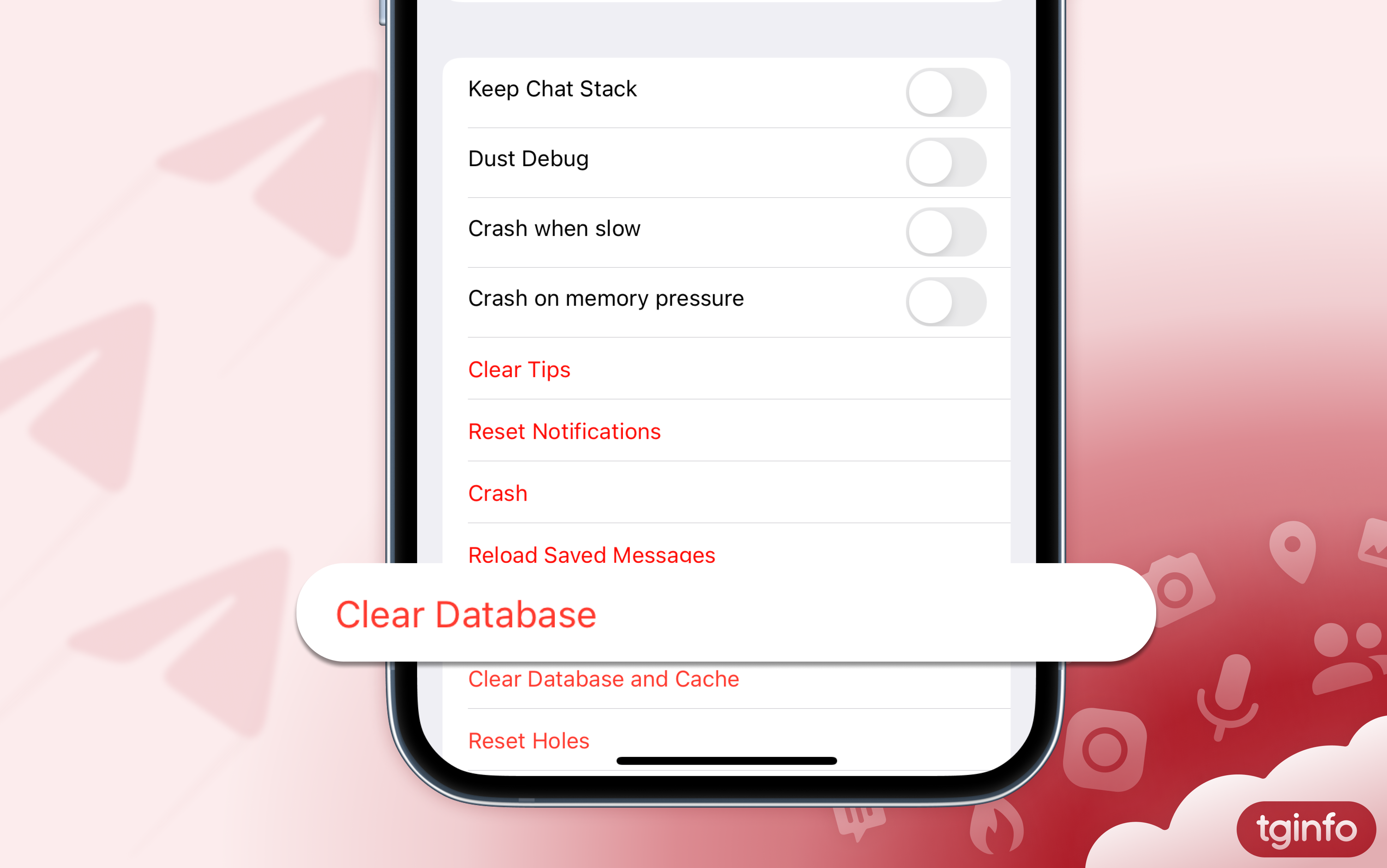
Fixing a Problem With Named Tags on iOS
In the latest update, Saved Messages received emoji tags for marking messages. Some users of Telegram for iOS have encountered the fact that they are unable to rename tags.
How to fix the problem:
1. Go to the "Debug" section. To do this, tap the settings icon 10 times.
2. Select "Clear Database" option.
⚠️ Please note: clearing the local database will delete your secret chats. All other data of your account will not be lost.
#iOS
In the latest update, Saved Messages received emoji tags for marking messages. Some users of Telegram for iOS have encountered the fact that they are unable to rename tags.
How to fix the problem:
1. Go to the "Debug" section. To do this, tap the settings icon 10 times.
2. Select "Clear Database" option.
⚠️ Please note: clearing the local database will delete your secret chats. All other data of your account will not be lost.
#iOS
🤡18👍17
This media is not supported in your browser
VIEW IN TELEGRAM
View Saved Messages by Chat
• A new menu bar item called “View as Chats” was added to Saved Messages which lets you see a list of all private chats, groups, and channels you have saved messages from.
• Any message sent normally (not forwarded from anywhere), will be in a separate section called “My Notes”.
• Any message forwarded from someone not allowing their forwarded messages to be linked to them, will be in a separate section called “Author Hidden”.
• 5 of the chats can be pinned to the top. If subscribed to Telegram Premium, you can pin up to 100 of them.
• This mode of viewing can be toggled from the Saved Messages menu bar.
More on this update can be found here.
• A new menu bar item called “View as Chats” was added to Saved Messages which lets you see a list of all private chats, groups, and channels you have saved messages from.
• Any message sent normally (not forwarded from anywhere), will be in a separate section called “My Notes”.
• Any message forwarded from someone not allowing their forwarded messages to be linked to them, will be in a separate section called “Author Hidden”.
• 5 of the chats can be pinned to the top. If subscribed to Telegram Premium, you can pin up to 100 of them.
• This mode of viewing can be toggled from the Saved Messages menu bar.
More on this update can be found here.
👍20🤡3
This media is not supported in your browser
VIEW IN TELEGRAM
• Saved messages can now be organized using tags.
• The message tagging feature is based on emojis, so assigning a tag is as easy as adding a reaction.
• You can quickly assign tags after forwarding a message to Saved Messages.
• Unlike reactions, tags can title a name that can up to 12 characters long. To assign a name, tap and hold a tag, then choose Add Title.
• All of your tags are displayed under the search bar. Just click on one of them to see all messages with that specific tag assigned.
• You can also tap and hold a tag, and choose “Search by Tag” to do the same.
• Tags are currently only available for users subscribed to Telegram Premium.
More on this update can be found here.
Please open Telegram to view this post
VIEW IN TELEGRAM
🎉12👍8🤡6❤4
This media is not supported in your browser
VIEW IN TELEGRAM
Read Time in Private Chats
• In private chats, you can now see the exact time the message was read.
• A separate private setting was also added which can be found in Privacy > Read Time.
• If you have hid your last seen from certain users, you are also able to hide the message read times from them.
• For privacy reasons, read times in both private chats and groups are kept only for 7 days.
More on this update can be found here.
• In private chats, you can now see the exact time the message was read.
• A separate private setting was also added which can be found in Privacy > Read Time.
• If you have hid your last seen from certain users, you are also able to hide the message read times from them.
• For privacy reasons, read times in both private chats and groups are kept only for 7 days.
More on this update can be found here.
👍20😱4
This media is not supported in your browser
VIEW IN TELEGRAM
• Users that are subscribed to Telegram Premium can now choose from two options to limit who is able to message them: "Everybody" or "My Contacts and Premium Users".
• If the second option is chosen, users who are not in your contacts and don't have an active Premium subscription, will not be able to initiate a private chat with you.
⚠️ Note: if you have ever sent at least one message to someone in the past, they are still able to message you, even if they are not subscribed to Premium and not in your contacts.
More on this update can be found here.
Please open Telegram to view this post
VIEW IN TELEGRAM
👍30🤡14❤8🤯3👎1💔1
This media is not supported in your browser
VIEW IN TELEGRAM
Telegram for Android Has Been Updated to Version 10.6.4
In this version, the developers have simplified access to the chat search. Now users can tap and hold the chat header to make an input field appear.
Earlier, the ability to quickly open a search was only available to users of Telegram for iOS.
In addition, some bugs have been fixed in the new version.
#update #Android
In this version, the developers have simplified access to the chat search. Now users can tap and hold the chat header to make an input field appear.
Earlier, the ability to quickly open a search was only available to users of Telegram for iOS.
In addition, some bugs have been fixed in the new version.
#update #Android
👍64❤19👎3
Telegram X Has Been Updated to Version 0.26.3.1674
What's new:
• Set the link preview location and its media size. Selecting the desired preview if there are multiple links in the text.
• Customizing the profile picture display when reacting.
• Display the reaction to the last message in the chat list.
• Added new "Stickers and Emoji" settings to the display.
• Display large emoji if the message only contains them.
• Animated profile pictures of people in messages.
• Voting in polls and responding to messages on the channel's behalf.
• Archive settings management.
• Selecting and editing profile picture in the app.
• Updated screen resolution for users.
• Display the timer in a group with enabled slow mode.
• Send allowed media types in chats where text messaging is not allowed.
• Unread message count on the Chats tab.
• Privacy settings for public profile pictures, bio and adding to channels/groups.
• Improved notifications.
• Install and manage installed custom emoji sets.
• Full-screen message reaction selection panel.
Download from Google Play, or from official channel @tgx_log.
#Android #TelegramX #update
What's new:
• Set the link preview location and its media size. Selecting the desired preview if there are multiple links in the text.
• Customizing the profile picture display when reacting.
• Display the reaction to the last message in the chat list.
• Added new "Stickers and Emoji" settings to the display.
• Display large emoji if the message only contains them.
• Animated profile pictures of people in messages.
• Voting in polls and responding to messages on the channel's behalf.
• Archive settings management.
• Selecting and editing profile picture in the app.
• Updated screen resolution for users.
• Display the timer in a group with enabled slow mode.
• Send allowed media types in chats where text messaging is not allowed.
• Unread message count on the Chats tab.
• Privacy settings for public profile pictures, bio and adding to channels/groups.
• Improved notifications.
• Install and manage installed custom emoji sets.
• Full-screen message reaction selection panel.
Download from Google Play, or from official channel @tgx_log.
#Android #TelegramX #update
👍45❤19🎉7😱5🌚5🐳4🤯3👎1
Telegram X in AppGallery
Telegram X is now available in the Huawei app store. The client was added to the AppGallery earlier, but only recently received support for Huawei services, which allows you to use notifications on devices without Google Mobile Services.
You can download the app from AppGallery here.
#TelegramX #Android
Telegram X is now available in the Huawei app store. The client was added to the AppGallery earlier, but only recently received support for Huawei services, which allows you to use notifications on devices without Google Mobile Services.
You can download the app from AppGallery here.
#TelegramX #Android
👍48🎉16❤12🤡10🤯4🐳1
Telegram Info English
The @tginfo editors has analyzed new lines discovered by @tgcrawl on the Telegram translations platform, and anticipates that the upcoming update will bring support for a boost system in groups. Boosts in groups will work similar to boosts in channels, but with some differences.
• Ability to boost the group
Group members will be able to boost the group to unlock additional features.
• Stories in Groups
Group administrators will have the ability to post a specific number of stories per day in the group, based on the chat's level.
• Boosts for Telegram Premium giveaway
The group will receive boosts for Telegram Premium subscriptions given away among its members.
• Group Customization
Administrators will have the ability to set emoji statuses, wallpapers, and a custom logo for the group header, visible to all chat members.
• Access to Custom Emojis
Administrators can install a group emoji pack. All members can use emojis from this pack in the group, even without a Telegram Premium subscription.
• Voice Message Transcription
Group members can transcribe voice messages sent in the group, even without a Premium subscription.
• Removal of restrictions for those who boosted the group
Administrators will have the ability to lift group restrictions for those who have boosted a certain number of times for the chat. For example: in a group where media sending is prohibited, users who have boosted 4 times for the chat will be able to send media.
• Real-Time Translation
Every group member will have the ability to translate all messages in the chat in real-time.
#boosts
Please open Telegram to view this post
VIEW IN TELEGRAM
👍53🤡41❤14🌚14🎉9🤯6👎5
The @tginfo editors discovered new images on Telegram's translation platform and noticed the following features that are related to the ability to boost groups:
• Updated screen with group level and number of active boosts.
• In addition to the special link, it will be possible to give your boost using the three-dot menu.
• When one of the users gives the group their boosts, a system message will appear in the group.
• The giveaway message will be sent to chat on behalf of the administrator who organized this giveaway.
• The ability to set a public emoji pack in group will be available in Group Settings › Appearance
• All group members will see a note that they can use the chat emoji pack even without a Telegram Premium.
We talked about what features will be available to groups with the addition of the boost system in this post.
#boosts
Please open Telegram to view this post
VIEW IN TELEGRAM
🤡50👍18👎10🐳4🌚2
Telegram Info English
The Beta version of Telegram for Android has introduced boosts in groups.
The @tginfo editors have talked about what features the boosts bring to the group here and here. However, some other features have been found in the Beta version 10.8.0:
• Only supergroups can be boosted. There is no such ability in regular groups.
• The number of boosts a group needs to get each new level is different than in channels. Let us remind you that in channels this number is equal to the total number of subscribers divided by 250. The formula for groups is still unknown, but it is already clear that each level in a group requires much more boosts: probably, for groups the total number of members is divided by 25.
• The number of boosts is displayed next to the messages of those members who have given their boosts to the group. Apparently, it is not possible to disable the display of this information.
• The service message that someone has transferred their boosts is not always displayed in groups.
#boosts
Please open Telegram to view this post
VIEW IN TELEGRAM
🤡42👍23❤8👎1