
KeralaGram [Official]®
✨Telegram Voice Calls is coming to Desktop✨ Telegram Desktop Alpha 1.0.36 — Telegram Calls are now available on desktops (Windows, Mac, Linux) : secure, crystal-clear, constantly improved by artificial intelligence. — Bug fixes and other minor improvements.…
The alpha version of Telegram Desktop has been updated to 1.0.37 alpha:
• Fixed various bugs where the application would fail.
• Other various fixes and improvements.
#update #tdesktop
ℹ️ @KeralagramChannel
• Fixed various bugs where the application would fail.
• Other various fixes and improvements.
#update #tdesktop
ℹ️ @KeralagramChannel
✨Telegram Desktop was updated to version 1.1✨
🆕 What's new :
• Telegram Calls are now available on desktops: secure, crystal-clear, constantly improved by artificial intelligence.
• The new Emoji, Stickers, and Saved GIFs panel becomes a separate space on the right when Telegram is running in a wide enough window.
• Manage blocked users list in your supergroups.
• Chat admins can delete messages by other members (normal groups).
• Fixed various bugs.
2017-05-15 #tdesktop #stable
ℹ️ @KeralagramChannel
✨ Quickly share posts from channels and media messages from bots.
#Tdesktop #alpha
ℹ️ @KeralagramChannel
#Tdesktop #alpha
ℹ️ @KeralagramChannel
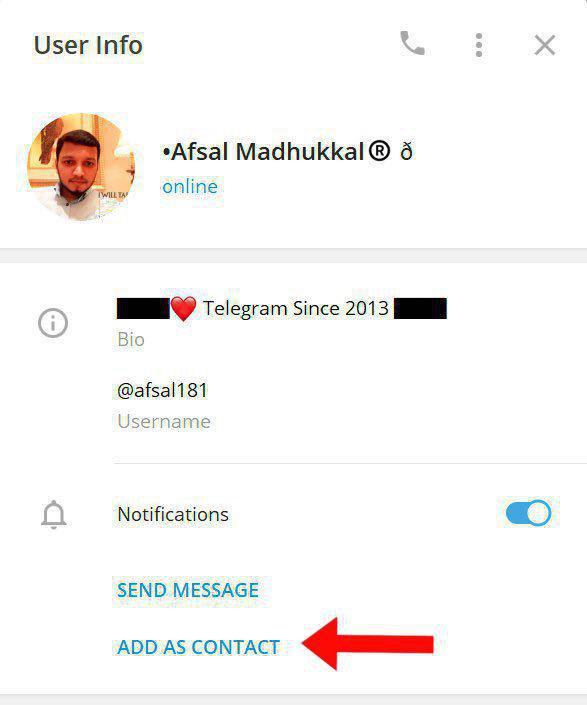
If someone shares any Telegram contact with you or in a group you are available, after the chat gets loaded, that user info will show option to Add as Contact.
(Currently only on #Tdesktop)
ℹ️ @KeralagramChannel
(Currently only on #Tdesktop)
ℹ️ @KeralagramChannel
This media is not supported in your browser
VIEW IN TELEGRAM
• PiP (Picture-in-Picture) mode and playback speed for video.
• Rotate photos and videos.
#Telegram #TDesktop v1.9.13
Video credit : @tgbeta
ℹ️ @KeralagramChannel
• Rotate photos and videos.
#Telegram #TDesktop v1.9.13
Video credit : @tgbeta
ℹ️ @KeralagramChannel
Show Notifications from All Accounts/Active Account
#New #Telegram #Beta #TDesktop v2.1.16
ℹ️ @KeralagramChannel
#New #Telegram #Beta #TDesktop v2.1.16
ℹ️ @KeralagramChannel
• Show Notifications from All Accounts/Active Account
#New #Telegram #Beta #TDesktop v2.1.16
ℹ️ @KeralagramChannel
#New #Telegram #Beta #TDesktop v2.1.16
ℹ️ @KeralagramChannel
Chat Themes, Interactive Emoji, Read Receipts in Groups and Live Stream Recording
🌐 Blog : https://telegram.org/blog/chat-themes-interactive-emoji-read-receipts
#Telegram #Stable #Update #Android #iOS #TDesktop #macOS
ℹ️ @KeralagramChannel
🌐 Blog : https://telegram.org/blog/chat-themes-interactive-emoji-read-receipts
#Telegram #Stable #Update #Android #iOS #TDesktop #macOS
ℹ️ @KeralagramChannel
✨ TELEGRAM | UPDATES ✨
iOS : Version 8.1
Android : Version 8.1
TDesktop : Version 3.0
macOS : Version 8.1
🆕 What's New: 19
Chat Themes
• Choose one of 8 new preset themes for any individual private chat.
• Tap the chat header > More (⋯) > 'Change Colors' to pick a theme.
• Both chat participants will see the same theme in that chat – on all their devices.
• Each new theme features colorful gradient message bubbles, beautifully animated backgrounds and unique background patterns.
• All chat themes have day and night versions and will follow your overall dark mode settings.
• More chat themes coming soon.
Interactive Emoji
• Some animated emoji now have fullscreen effects.
• Send 🎆 🎉 🎈 👍 💩 or ❤️ to any private chat, then tap on the animated emoji to launch the effect.
• If your chat partner also has the chat open, you will both see the effects and feel the vibrations simultaneously.
• See the "Watching" status when your chat partner is enjoying emoji effects with you.
• More interactive emoji coming soon.
Read Receipts in Small Groups
• Select one of your outgoing messages in small groups to see who recently viewed it.
• To protect privacy, read receipts are only stored for 7 days after the message was sent.
Record Live Streams and Video Chats
• Record video and audio from live broadcasts in your group or channel.
• Admins can start recording from the Settings menu (⋯).
• Choose between recording in portrait or landscape orientation.
• Finished recordings are sent to the admin's Saved Messages and can be easily shared.
More about this update:
https://telegram.org/blog/chat-themes-interactive-emoji-read-receipts
------------
iOS : 📤 AppStore | 📥 TestFlight
Android : 📤 PlayStore | 📥 Appcenter
Mac : 📤 macOS | 📤 Appcenter
Desktop : 📤 Tdesktop
#Telegram #Stable #Update #Android #iOS #TDesktop #macOS
ℹ️ @KeralagramChannel
iOS : Version 8.1
Android : Version 8.1
TDesktop : Version 3.0
macOS : Version 8.1
🆕 What's New: 19
SEP 2021
Chat Themes, Interactive Emoji, Read Receipts in Groups and Live Stream RecordingChat Themes
• Choose one of 8 new preset themes for any individual private chat.
• Tap the chat header > More (⋯) > 'Change Colors' to pick a theme.
• Both chat participants will see the same theme in that chat – on all their devices.
• Each new theme features colorful gradient message bubbles, beautifully animated backgrounds and unique background patterns.
• All chat themes have day and night versions and will follow your overall dark mode settings.
• More chat themes coming soon.
Interactive Emoji
• Some animated emoji now have fullscreen effects.
• Send 🎆 🎉 🎈 👍 💩 or ❤️ to any private chat, then tap on the animated emoji to launch the effect.
• If your chat partner also has the chat open, you will both see the effects and feel the vibrations simultaneously.
• See the "Watching" status when your chat partner is enjoying emoji effects with you.
• More interactive emoji coming soon.
Read Receipts in Small Groups
• Select one of your outgoing messages in small groups to see who recently viewed it.
• To protect privacy, read receipts are only stored for 7 days after the message was sent.
Record Live Streams and Video Chats
• Record video and audio from live broadcasts in your group or channel.
• Admins can start recording from the Settings menu (⋯).
• Choose between recording in portrait or landscape orientation.
• Finished recordings are sent to the admin's Saved Messages and can be easily shared.
More about this update:
https://telegram.org/blog/chat-themes-interactive-emoji-read-receipts
------------
iOS : 📤 AppStore | 📥 TestFlight
Android : 📤 PlayStore | 📥 Appcenter
Mac : 📤 macOS | 📤 Appcenter
Desktop : 📤 Tdesktop
#Telegram #Stable #Update #Android #iOS #TDesktop #macOS
ℹ️ @KeralagramChannel
Telegram
Chat Themes, Interactive Emoji, Read Receipts in Groups and Live Stream Recording
Today's update lets you set different themes for individual chats, share your feelings with loved ones using interactive emoji with fullscreen effects, record video and audio from live broadcasts, and see detailed read receipts in groups.
✨ TELEGRAM | UPDATES ✨
Hyper-Speed Scrolling and Calendar View for Shared Media, Join Requests, Global Chat Themes and More..
iOS : Version 8.2
Android : Version 8.2
macOS : Version 8.2
TDesktop : Version 3.1.13
🆕 What's New:
• Quickly scroll through Shared Media by dragging the new date bar.
• Pinch to zoom in and out for more or fewer photos in each row.
• View Shared Media as a calendar by tapping (⋯) or on the new date bar.
• Filter media by photos only, videos only, or both from the (⋯) menu.
• To see Shared Media, simply tap the header at the top of your screen in any chat and scroll down.
Join Requests for Groups and Channels
• Create special invite links that require admins to approve users before they become members.
• Admins can view the applicants’ profiles and bios by tapping the Join Requests bar at the top of the chat.
• Add internal labels to your chat's Invite Links to keep them organized.
More Interactive Emoji
• Send one 👻 👎 🤮 😂 💸 or 🎃 to any private chat, then tap on the animated emoji to launch a fullscreen effect.
• If your chat partner also has the chat open, you will both see the effects and feel the vibrations simultaneously.
• This also works with 🎆 🎉 🎈 👍 💩 and ❤️
What's More....??
👉🏻iOS
Global Chat Themes
• Apply one of 8 new preset themes to your entire app – each theme has a Day and Night mode, colorful animated backgrounds and gradient message bubbles.
• Personalize these themes and find custom theme options in Appearance Settings > Chat Themes.
Transit Time for Shared Locations
• Tap a user's shared Location or Live Location to see how long it will take you to reach them by foot, car or public transport.
• Tap on the travel time to open the location in another app.
Instant Media Captions
• Attach media while typing a message, and the draft text will instantly become the media caption.
PiP on iOS 15
• Watch a video in picture-in-picture mode while you use other apps.
👉🏻TDesktop
• Run natively on Apple Silicon (macOS only).
👉🏻Android
• Both transit times for shared locations and instant media captions will be added to Android app in the coming updates.
More about this update:
https://telegram.org/blog/shared-media-scrolling-calendar-join-requests-and-more
------------
iOS : 📤 AppStore | 📥 TestFlight
Android : 📤 PlayStore | 📥 Appcenter
Mac : 📤 macOS | 📤 Appcenter
Desktop : 📤 Tdesktop
#Telegram #Stable #Update #Android #iOS #TDesktop #macOS #Nov2021
ℹ️ @KeralagramChannel
Hyper-Speed Scrolling and Calendar View for Shared Media, Join Requests, Global Chat Themes and More..
iOS : Version 8.2
Android : Version 8.2
macOS : Version 8.2
TDesktop : Version 3.1.13
🆕 What's New:
03 NOV 2021
Hyper-Speed Scrolling and Calendar View for Shared Media• Quickly scroll through Shared Media by dragging the new date bar.
• Pinch to zoom in and out for more or fewer photos in each row.
• View Shared Media as a calendar by tapping (⋯) or on the new date bar.
• Filter media by photos only, videos only, or both from the (⋯) menu.
• To see Shared Media, simply tap the header at the top of your screen in any chat and scroll down.
Join Requests for Groups and Channels
• Create special invite links that require admins to approve users before they become members.
• Admins can view the applicants’ profiles and bios by tapping the Join Requests bar at the top of the chat.
• Add internal labels to your chat's Invite Links to keep them organized.
More Interactive Emoji
• Send one 👻 👎 🤮 😂 💸 or 🎃 to any private chat, then tap on the animated emoji to launch a fullscreen effect.
• If your chat partner also has the chat open, you will both see the effects and feel the vibrations simultaneously.
• This also works with 🎆 🎉 🎈 👍 💩 and ❤️
What's More....??
👉🏻iOS
Global Chat Themes
• Apply one of 8 new preset themes to your entire app – each theme has a Day and Night mode, colorful animated backgrounds and gradient message bubbles.
• Personalize these themes and find custom theme options in Appearance Settings > Chat Themes.
Transit Time for Shared Locations
• Tap a user's shared Location or Live Location to see how long it will take you to reach them by foot, car or public transport.
• Tap on the travel time to open the location in another app.
Instant Media Captions
• Attach media while typing a message, and the draft text will instantly become the media caption.
PiP on iOS 15
• Watch a video in picture-in-picture mode while you use other apps.
👉🏻TDesktop
• Run natively on Apple Silicon (macOS only).
👉🏻Android
• Both transit times for shared locations and instant media captions will be added to Android app in the coming updates.
More about this update:
https://telegram.org/blog/shared-media-scrolling-calendar-join-requests-and-more
------------
iOS : 📤 AppStore | 📥 TestFlight
Android : 📤 PlayStore | 📥 Appcenter
Mac : 📤 macOS | 📤 Appcenter
Desktop : 📤 Tdesktop
#Telegram #Stable #Update #Android #iOS #TDesktop #macOS #Nov2021
ℹ️ @KeralagramChannel
Telegram
Hyper-Speed Scrolling and Calendar View for Shared Media, Join Requests, Global Chat Themes on iOS and More
Today's update brings new ways to find memories in shared media with accelerated scrolling and a calendar view, an admin approval setting for invite links, global chat themes for your entire app, and more.
✨ TELEGRAM | UPDATES ✨
iOS : Version 8.3
Android : Version 8.3
macOS : Version 8.3
TDesktop : Version 3.3
🆕 What's New:
Protected Content in Groups and Channels
• Content creators can restrict the ability to forward messages from their groups and channels.
• When forwarding is restricted, users will also be unable to directly save media from the chat or take screenshots.
• Toggle this option on or off via Chat Info > Group / Channel Type.
Delete Messages by Date
• Clear messages in one-on-one chats from a specific date or period of time.
• Tap the date header in a chat to open the calendar and select a single day or range to delete.
Manage Connected Devices
• Choose how long a device may stay inactive before it's logged out automatically.
• Select a device to control whether it is allowed to accept Calls or new Secret Chats.
Anonymous Posting in Public Groups
• Comment as one of your channels in public groups and channel comments.
• Tap the profile picture next to the message bar to choose which channel you will appear as when you send the message.
New Ways to Log In via Call
• some mobile devices will be offered the option to receive a login call from Telegram and then enter several digits of the phone number that called – instead of getting codes via text message.
Responses to Join Requests
• When you request to join a group or channel and its admin responds with a message, you will see which community they are from at the top of the chat.
What's More....??
👉🏻iOS
Text Recognition on iOS 13+
• On devices with iOS 13 and above, Text Recognition (Live Text) is enabled for photos in Telegram chats, allowing you to quickly select, copy and search without touching your keyboard. This image recognition is securely handled entirely on your device.
Format Text in Media Captions on iOS
• Like normal test message, now you can use all text formatting options in media captions as well – including text links.
Redesigned Contact Info on iOS
• Contacts, Groups and Channels have updated info pages with a new look in the style of iOS 15.
👉🏻Android
Global Chat Themes on Android
• Apply one of 8 new preset themes to your entire app – each theme has a Day and Night mode, colorful animated backgrounds and gradient message bubbles.
• Like all themes, you can personalize these designs and tweak the colors or change the pattern. For more options and custom settings, tap ‘Browse Themes’ to edit and share your creations.
More about this update:
https://telegram.org/blog/protected-content-delete-by-date-and-more
------------
iOS : 📤 AppStore | 📥 TestFlight
Android : 📤 PlayStore | 📥 Appcenter
Mac : 📤 macOS | 📤 Appcenter
Desktop : 📤 Tdesktop
#Telegram #Stable #Update #Android #iOS #TDesktop #macOS
ℹ️ @KeralagramChannel
iOS : Version 8.3
Android : Version 8.3
macOS : Version 8.3
TDesktop : Version 3.3
🆕 What's New:
07 DEC 2021
Protected Content, Delete by Date, Device Management and More..Protected Content in Groups and Channels
• Content creators can restrict the ability to forward messages from their groups and channels.
• When forwarding is restricted, users will also be unable to directly save media from the chat or take screenshots.
• Toggle this option on or off via Chat Info > Group / Channel Type.
Delete Messages by Date
• Clear messages in one-on-one chats from a specific date or period of time.
• Tap the date header in a chat to open the calendar and select a single day or range to delete.
Manage Connected Devices
• Choose how long a device may stay inactive before it's logged out automatically.
• Select a device to control whether it is allowed to accept Calls or new Secret Chats.
Anonymous Posting in Public Groups
• Comment as one of your channels in public groups and channel comments.
• Tap the profile picture next to the message bar to choose which channel you will appear as when you send the message.
New Ways to Log In via Call
• some mobile devices will be offered the option to receive a login call from Telegram and then enter several digits of the phone number that called – instead of getting codes via text message.
Responses to Join Requests
• When you request to join a group or channel and its admin responds with a message, you will see which community they are from at the top of the chat.
What's More....??
👉🏻iOS
Text Recognition on iOS 13+
• On devices with iOS 13 and above, Text Recognition (Live Text) is enabled for photos in Telegram chats, allowing you to quickly select, copy and search without touching your keyboard. This image recognition is securely handled entirely on your device.
Format Text in Media Captions on iOS
• Like normal test message, now you can use all text formatting options in media captions as well – including text links.
Redesigned Contact Info on iOS
• Contacts, Groups and Channels have updated info pages with a new look in the style of iOS 15.
👉🏻Android
Global Chat Themes on Android
• Apply one of 8 new preset themes to your entire app – each theme has a Day and Night mode, colorful animated backgrounds and gradient message bubbles.
• Like all themes, you can personalize these designs and tweak the colors or change the pattern. For more options and custom settings, tap ‘Browse Themes’ to edit and share your creations.
More about this update:
https://telegram.org/blog/protected-content-delete-by-date-and-more
------------
iOS : 📤 AppStore | 📥 TestFlight
Android : 📤 PlayStore | 📥 Appcenter
Mac : 📤 macOS | 📤 Appcenter
Desktop : 📤 Tdesktop
#Telegram #Stable #Update #Android #iOS #TDesktop #macOS
ℹ️ @KeralagramChannel
Telegram
Protected Content, Delete by Date, Device Management and More
Today's update brings tools to prevent others from saving content from groups and channels, the ability to delete messages for specific periods of time, new ways to manage your connected devices, post anonymously in public groups on behalf of your channel…
❤2👍1
✨ TELEGRAM | UPDATES ✨
iOS : Version 8.4
Android : Version 8.4
macOS : Version 8.4
TDesktop : Version 3.4
🆕 What's New:
Reactions
• Double tap a message to send a quick 👍🏻 reaction.
• Press and hold a message for more reactions.
• Change your quick reaction emoji in Settings > Stickers and Emoji.
• Group and Channel admins can enable reactions in their chat via Chat Info > Edit > Reactions.
Spoilers
• Select text when typing and choose 'Spoiler' formatting to hide some or all of the contents of a message.
• Tap the spoiler animation in chat to reveal its hidden text.
• Spoiler formatting hides text in chat, as well as in the chat list and notifications.
Message Translation
• Turn on the Translation option in Settings > Languages.
• Press and hold a message to translate it into another language.
Themed QR Codes
• Generate a custom QR Code that leads to your public t.me link.
• Tap the QR code icon in public profiles for groups, bots and channels to let someone quickly scan it with their device.
More Interactive Emoji
• Added new interactive versions of 🔥 😁 🤩 😢 😭 😱 ❄️. Send any of them in 1-on-1 chats, then tap to unleash a full-screen effect for you and your partner.
What's More....??
👉🏻macOS
New Menus for macOS
• Redesigned all the context menus in Telegram for macOS – adding some new shortcut hints and introducing beautifully animated icons for every single menu item in the app.
------------
More about this update:
https://telegram.org/blog/reactions-spoilers-translations
------------
iOS : 📤 AppStore | 📥 TestFlight
Android : 📤 PlayStore | 📥 Appcenter
Mac : 📤 macOS | 📤 Appcenter
Desktop : 📤 Tdesktop
#Telegram #Stable #Update #Android #iOS #TDesktop #macOS #Dec2021
ℹ️ @KeralagramChannel
iOS : Version 8.4
Android : Version 8.4
macOS : Version 8.4
TDesktop : Version 3.4
🆕 What's New:
30 DEC 2021
Reactions, Spoilers, Translation and QR CodesReactions
• Double tap a message to send a quick 👍🏻 reaction.
• Press and hold a message for more reactions.
• Change your quick reaction emoji in Settings > Stickers and Emoji.
• Group and Channel admins can enable reactions in their chat via Chat Info > Edit > Reactions.
Spoilers
• Select text when typing and choose 'Spoiler' formatting to hide some or all of the contents of a message.
• Tap the spoiler animation in chat to reveal its hidden text.
• Spoiler formatting hides text in chat, as well as in the chat list and notifications.
Message Translation
• Turn on the Translation option in Settings > Languages.
• Press and hold a message to translate it into another language.
Themed QR Codes
• Generate a custom QR Code that leads to your public t.me link.
• Tap the QR code icon in public profiles for groups, bots and channels to let someone quickly scan it with their device.
More Interactive Emoji
• Added new interactive versions of 🔥 😁 🤩 😢 😭 😱 ❄️. Send any of them in 1-on-1 chats, then tap to unleash a full-screen effect for you and your partner.
What's More....??
👉🏻macOS
New Menus for macOS
• Redesigned all the context menus in Telegram for macOS – adding some new shortcut hints and introducing beautifully animated icons for every single menu item in the app.
------------
More about this update:
https://telegram.org/blog/reactions-spoilers-translations
------------
iOS : 📤 AppStore | 📥 TestFlight
Android : 📤 PlayStore | 📥 Appcenter
Mac : 📤 macOS | 📤 Appcenter
Desktop : 📤 Tdesktop
#Telegram #Stable #Update #Android #iOS #TDesktop #macOS #Dec2021
ℹ️ @KeralagramChannel
Telegram
Reactions, Spoilers, Translation and QR Codes
Telegram's 12th update of the year introduces reactions, message translation, themed QR codes, hidden text (spoilers), and more.
🎉95👍15🔥14❤8🤩5😱3💩3👎2
✨ TELEGRAM | UPDATES ✨
iOS : Version 8.5
Android : Version 8.5
macOS : Version 8.5
TDesktop : Version 3.5
🆕 What's New:
Video Stickers
• Use a new type of detailed stickers with smooth animations.
• Create new sets by sending
• Bring your custom animated stickers from other apps.
Better Reactions
• See smaller, compact animations when reacting to messages.
• Press and hold an emoji in the reaction menu to send a bigger animation.
• See real-time animations in chat when a user reacts to your message.
• React with additional emoji expressing love, appreciation, anger or surprise.
Read Status for Reactions
• Tap the new button in chats to jump to your messages that have unseen reactions.
• Watch the animations for unseen reactions play when you hit the button.
Navigate Recent Chats
• Quickly return to a specific chat after following links to other chats or jumping to the next unread channel.
• Long-press the Back button to choose which chat to return to.
New Reactions and Interactive Emoji
• Added 5 new reactions 🥰🤯🤔🤬👏 .
• These reactions can also be sent as interactive emoji. Send a single 🥰🤯🤔🤬 or 👏 to any private chat, then tap on the animated emoji to unleash a synchronized fullscreen effect.
What's More....??
👉🏻iOS
New animations in iOS
• On iOS, you'll also notice new animations when tapping icons in the tab bar.
👉🏻TDesktop
• The app will warn you before closing if you are uploading photos or files to a chat.
• Enjoy better screencast quality in video chats.
More about this update:
https://telegram.org/blog/video-stickers-better-reactions
------------
iOS : 📤 AppStore | 📥 TestFlight
Android : 📤 PlayStore | 📥 Appcenter
Mac : 📤 macOS | 📤 Appcenter
Desktop : 📤 Tdesktop
#Telegram #Stable #Update #Android #iOS #TDesktop #macOS
ℹ️ @KeralagramChannel
iOS : Version 8.5
Android : Version 8.5
macOS : Version 8.5
TDesktop : Version 3.5
🆕 What's New:
31 JAN 2022
Video Stickers, Better Reactions and More..Video Stickers
• Use a new type of detailed stickers with smooth animations.
• Create new sets by sending
.webm videos to @stickers.• Bring your custom animated stickers from other apps.
Better Reactions
• See smaller, compact animations when reacting to messages.
• Press and hold an emoji in the reaction menu to send a bigger animation.
• See real-time animations in chat when a user reacts to your message.
• React with additional emoji expressing love, appreciation, anger or surprise.
Read Status for Reactions
• Tap the new button in chats to jump to your messages that have unseen reactions.
• Watch the animations for unseen reactions play when you hit the button.
Navigate Recent Chats
• Quickly return to a specific chat after following links to other chats or jumping to the next unread channel.
• Long-press the Back button to choose which chat to return to.
New Reactions and Interactive Emoji
• Added 5 new reactions 🥰🤯🤔🤬👏 .
• These reactions can also be sent as interactive emoji. Send a single 🥰🤯🤔🤬 or 👏 to any private chat, then tap on the animated emoji to unleash a synchronized fullscreen effect.
What's More....??
👉🏻iOS
New animations in iOS
• On iOS, you'll also notice new animations when tapping icons in the tab bar.
👉🏻TDesktop
• The app will warn you before closing if you are uploading photos or files to a chat.
• Enjoy better screencast quality in video chats.
More about this update:
https://telegram.org/blog/video-stickers-better-reactions
------------
iOS : 📤 AppStore | 📥 TestFlight
Android : 📤 PlayStore | 📥 Appcenter
Mac : 📤 macOS | 📤 Appcenter
Desktop : 📤 Tdesktop
#Telegram #Stable #Update #Android #iOS #TDesktop #macOS
ℹ️ @KeralagramChannel
Telegram
Video Stickers, Better Reactions and More
This update brings easy-to-make video stickers, better reactions with more compact animations and extra emoji, a button to review unseen reactions, improved navigation between chats and more.
🤯18👏10❤6🔥5🥰5🎉4🤩3💩3👍2