Extra-Secure Group Calls, Automated Accounts, and More


Today’s update introduces extra-secure, easy-to-use group calls. We’re also rolling out a major upgrade that enables full automation for Telegram Business accounts, new options for gift users, a simpler way to appeal account restrictions — and more.
Secure Group Calls Made Easy
Telegram first introduced group calls in 2021, bringing powerful video chats for groups and live streams for channels.
Now, you can start an end-to-end encrypted conference call without creating a group chat — ideal for spontaneous meetings with coworkers or catching up with friends and family.
With our upgraded group calls, you can:
- Instantly add up to 200 users to any active call
- Share audio, video, or your screen with dozens of people
- Invite others with a call link or QR code
- Quickly verify end-to-end encryption using emoji
Protect your calls with encryption and distributed security
Group calls are secured with end-to-end encryption. Participants can confirm this by comparing the 4 emojis shown on their screens — if they all match, the call is fully secure.
In addition, group calls use blockchain-like technology to ensure that, unlike in other apps, no one — not even Telegram — can secretly join as a listener.
We welcome security researchers to study the detailed documentation and open source code that powers the new group calls. For more than 10 years, Telegram has offered over $100,000 to anyone who could crack its encryption protocol — and no one has ever succeeded.
How to start a group call
- From an existing call. Just call anyone on Telegram, then tap the 'Add Person' button in the top right corner of your screen — and you're all set.
- From the Calls Tab. Open your Calls Tab (you may need to enable it via Settings > Recent Calls), then tap New Call and select multiple people to call.
- Using a link. In the Calls Tab, tap New Call, then select New Call Link.
You can send your call link to others — even via email or other apps — so they can join the call when they're ready. It's perfect for scheduling group calls in advance or letting friends join at their convenience.
From the link menu, you can also generate a QR code for others to scan. Just tap the button and choose Get QR Code.
Automated Business Accounts
Telegram Business (Telegram Premium) users can add third-party chatbots — including AI-powered ones — to automatically manage messages. This update introduces over 10 new features, enabling businesses to fully automate their messaging, profile, transactions, and stories.
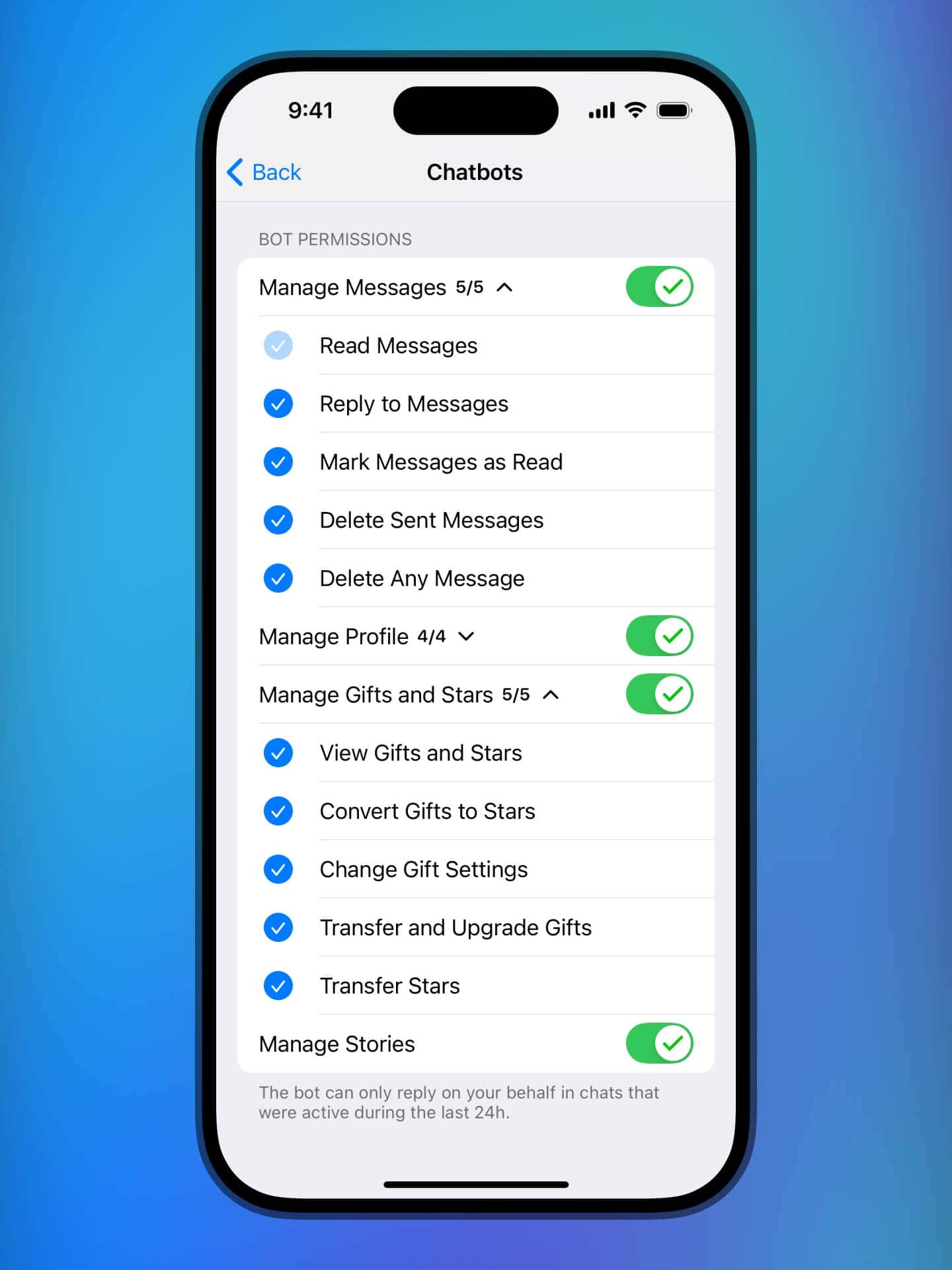
You can control permissions for third-party chatbots using streamlined settings like 'Manage Messages' or 'Manage Profile', with individual toggles for specific actions — such as deleting messages, editing profile photos, posting stories, and more.
Telegram Business is included for all Premium subscribers. To add a chatbot and manage its permissions, go to Settings > Telegram Business > Chatbots. Information for chatbot developers is available on this page.
Get More Gifts with These New Settings
In October, we introduced Telegram Gifts which you can send with Stars and upgrade to collectibles, unlocking unique styles and making them tradeable on the blockchain. Telegram users already exchange over 10 million gifts per month.
If you like sending and receiving gifts, you can add a 'Gift' button to the input field — both for you and your chat partners  .
.
You can now also choose which gifts are displayed on your profile. For example, if you want gifts from your contacts or certain friends to become visible automatically.
Premium users are able to select which gift types other users can send them. For example, popular accounts that turn on Star Messages can now choose to accept only 'Unique' or 'Limited-Edition' gifts — to make their inboxes even more manageable.
How to manage your gifts
To add the 'Gift' button, control which gifts are shown on your profile or choose which gifts you accept, go to Settings > Privacy & Security > Gifts.
You can also manage gifts on a one-by-one basis by going to My Profile and switching to the Gifts Tab. Tapping a gift lets you:
- Show or hide it from your profile.
- Pin it to the top of your gift list.
- Wear it to showcase it in your status.
- Transfer it to another user or your blockchain wallet.
To send a gift, open any user's profile and tap the 'Send Gift' button.
Appeal Account Restrictions with Frozen Accounts
Thanks to robust moderation tools and user reports, people who attempt to send scam or spam messages on Telegram are quickly detected and banned. While these systems have an extremely low error rate, users are now able to appeal their ban from inside Telegram in case of a mistake.
Rather than being immediately logged out, banned violators will have a frozen account — where they cannot contact other users, but are able to submit an appeal for our moderators to review. If successful, the account will be unfrozen and its restrictions will be lifted.
When an unknown user messages you for the first time, you can tap at the top of the chat to instantly block them and report their messages to moderators.
Do More Things Faster With New Gestures
Both iOS and Android have a new gesture to quickly forward channel posts to your Saved Messages or recent contacts — in just one tap. Simply hold down on the share arrow, drag your finger to the chat where you want to forward the message, and release.
For iOS users specifically, there's now an extra gesture to add a story. While browsing recent stories at the top of the chat list, you can pull right on the list of stories to instantly open the story editor and make a new post.
On iOS, swiping right on the main chat list itself also opens the story editor.
That's all for today. Enjoy these new features while we call in our developers to make more.
April 30, 2025
The Telegram Team
Other News

환영 메시지, 메시지 내 버튼 및 서명된 선물

리치 텍스트 에디터, 커뮤니티, 그룹 내 휘발성 메시지, 3억 5천만 개의 GIF

스마트워치 앱, 봇을 위한 리치 텍스트, 그룹을 위한 AI 가디언, 그리고 그 외에도 다양한 기능
